1.Introduction
This is the manual for the integration between Lightspeed eCom and SnelStart.
- This integration is a financial integration. It is not a logistics integration. It is not suitable for updating customers in SnelStart, printing packing slips, or synchronizing products/inventory.
- This integration does not replace the work of an accountant. It saves time because you no longer have to retype documents. The accountant is still needed for advice, expertise, and control.
Tip: Other customers using this integration found the tips in the FAQ for Lightspeed eCom and in the FAQ for SnelStart.
You install this integration from the Lightspeed eCom App Store. If you select the Accounting category, our apps will appear automatically. You can recognize us as a supplier by the blue area and the white gear icon at the top right. If you click on the App, you will see a description and the Install button. Upon activation, you will be automatically guided through the configuration screens.
The installation is complete when both connection dots are green, and the settings in the Configuration tab have been entered and saved.
Important: Once the integration is installed, always log in to the dashboard via https://uwkoppeling.webwinkelfacturen.nl, and not from the app store.
The trial period for the integration is 30 days.
If you want to install another integration, you can do so in the same way. Make sure you are logged out of the integration dashboard and preferably start the new installation in an incognito browser.
If you want to terminate the integration, you can simply remove the app from the app store in your backend.
Are you switching to another accounting system and want to create a new integration? You can install the new app from the app store in your backend. Make sure you are logged out of the dashboard of the old integration and preferably start the new installation in an incognito browser.
Are you switching to another webshop system? Via our integrations page you can see whether you install it from the relevant app store, or by means of an installation link.
Has the installation been successful, but do you see in the dashboard of the integration the old license key still present when you click the dropdown arrow next to the key (even though that app/key has been deleted)? If so, please send us an email requesting that the old key be removed.
2.How the integration works
The integration works with webhooks from the Lightspeed eCom webshop. Processing can be done in two ways, namely based on paid orders or invoices. The advantage of the option paid orders is that orders that are not paid do not enter the accounting system. With this option, however, credit notes are not included. With the option invoices all invoices are processed to SnelStart, so both debit and credit invoices. You can set the preference for paid orders or invoices via the Configuration tab of the dashboard.
Read more How the integration works .... Read less How the integration works ....
At the start of processing an order, we perform a number of checks on the Lightspeed eCom order or invoice:
- It is checked whether the total of the Lightspeed eCom order / invoice is equal to the sum of the amounts in the order / invoice lines plus the shipping costs amount.
- If the order / invoice is an ICP sale, the VAT number is checked.
- It is checked whether a corresponding VAT code exists in SnelStart for the VAT in each line.
- It is checked whether the order or invoice has not already been processed.
A payment for an order is only added if the order has been paid. For invoices, the payment is always processed, regardless of the status. A payment is only processed after the associated order / invoice has been processed first.
Processing orders or invoices
Processing a Lightspeed eCom order or invoice to SnelStart takes place in three steps:
- It is checked if the customer already exists in SnelStart. If not, the customer is created. Matching is based on the email address.
- When processing to SnelStart orders, it is checked whether the products from the Lightspeed eCom order or invoice are already present in SnelStart. Missing products are created.
- The SnelStart transaction (financial entry, order) is created and processed.
When processing a payment, the integration first looks up the outstanding item in SnelStart that belongs to the invoice. The integration uses the following criteria to search for the outstanding item:
- A match is performed on the amount
- If a customer email address is available, a match is performed on this email address
- A match is performed on the order number and the description in the payment
After the order or invoice has been forwarded and a success message from SnelStart has been received, the order or invoice is marked as handled. The Lightspeed eCom order appears at the Reporting tab on the dashboard.
If SnelStart returns an error while processing the order or invoice, the order or invoice appears in the Errors tab on the dashboard. Via the yellow button More info more information about the problem can be found. Via the red button Report problem can the order or invoice with all necessary information easily be submitted to us after you have tried to resolve the problem yourself. If the problem is solved, in some cases the orders or invoices can be processed again with the blue Process button.
When forwarding the payment, the payment is also registered so that it cannot be processed again. Payments can also be reviewed via the dashboard.
Data
Information about the data that is processed can be found in the section Day-to-day: To SnelStart later in the manual.
3.Required: Snelstart API key
To establish the connection with your Snelstart account, you need to create a special key. This key is a secret key that authorizes the integration to read from your Snelstart account and, for example, add debtors and sales entries to your account. Essentially, the key is a special password for the connection.
You create the key depending on your Snelstart administration. Therefore, ensure that you check that you create the key for the administration in which you want to book the revenue.

To create the key for Snelstart, log in to the web version of Snelstart at https://web.snelstart.nl. Go to the 'Connections' menu item and search for 'Webwinkelfacturen'. Various tiles for different systems will now appear. Look for the tile for Lightspeed eCom.
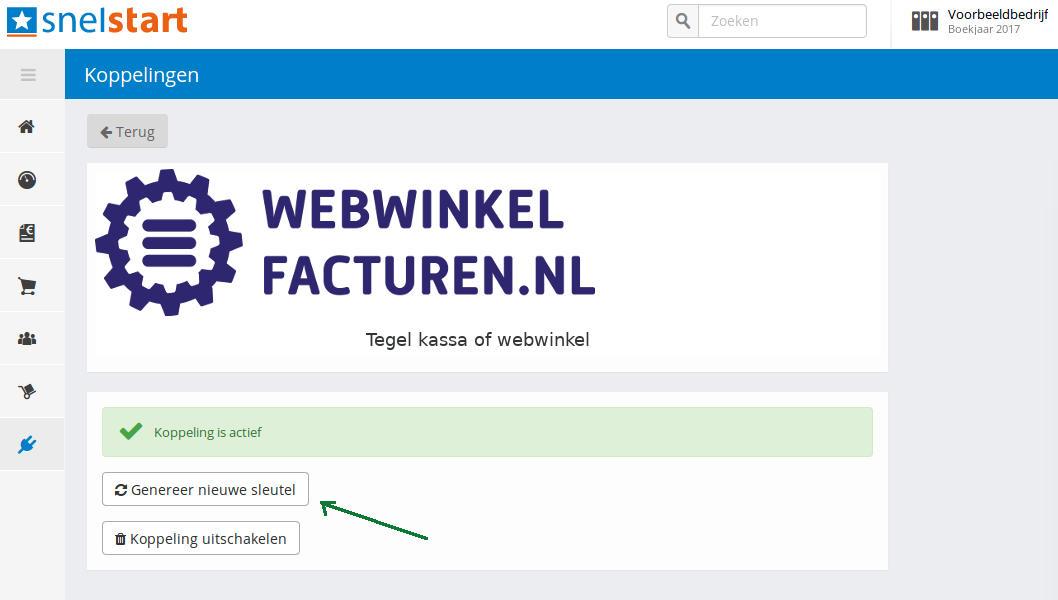
Now click on Generate the key. Copy this key and save it. You will need to enter it later during the installation of the connection.

4.Installation
The integration between Lightspeed eCom and snelstart is installed via the Lightspeed App Store. First, the connection with your webshop is established and you authorize the integration to read data from your webshop.
Read more Installation .... Read less Installation ....
Two more steps need to be completed:
1. Establishing the connection with SnelStart. This authorizes the integration to write transactions to your SnelStart administration and to read information.
2. The configuration itself.
SnelStart connection
You establish the connection with SnelStart via the key you determined in the previous step. Click the red Connect button next to SnelStart. You can now enter the key in the popup window.

It is possible to set a journal. If you process to SnelStart financial entries, setting it is optional, and you fill in Debtors.

When configuring the VAT rates and general ledger accounts, a link is created between the VAT rates in webshop and the VAT codes and revenue accounts in SnelStart. You can always make changes by clicking the blue 'Edit' button and selecting an option from the drop-down menus.
By default, the integration shows a fixed list of VAT rates per EU country. You can configure this fixed list. If you provide OSS, you can easily adjust the list with the correct VAT percentage per country. If you prefer to use the VAT rates from your webshop, you can adjust this in the contract settings. Intra-Community (ICP) and international deliveries
The Intra-Community supplies / ICP option is intended for business-to-business deliveries within the EU. These sales are invoiced with 0% VAT. A VAT number from the customer is required. The International option applies to deliveries outside the EU. For these sales, the integration expects 0% VAT; otherwise, the sales cannot be processed. Separate VAT codes and general ledger accounts can be configured for both ICP and international deliveries.
Once the VAT settings have been configured and saved, you will always see the selected VAT rates. If you want to start over, you can use the grey 'Remove VAT settings' button. Your current settings will then be deleted and you can begin again.

You can create a link here between the payment methods in the webshop and a fixed debtor in your SnelStart administration. Orders or invoices with a payment method from the list will then always be posted to this debtor. In that case, no new debtors will be created.
Note: It is not possible to set fixed debtors for ICP orders or invoices. For an ICP order or invoice, a valid VAT number must be transmitted. Therefore, a debtor will always be created in SnelStart for an ICP order or invoice.

When processing payments, a clearing account of type Payment methods is set in SnelStart. When setting up the clearing accounts, there is no (longer a) possibility to post to fixed debtors per payment method.

5.Day-to-day: From Lightspeed
Payments (if activated)
When processing payments, the integration checks the Lightspeed eCom orders or invoices that have been successfully processed to SnelStart every day. If the order or invoice has a valid payment - a transaction with status success - this payment will also be processed to SnelStart. Checking payments on Lightspeed eCom orders or invoices is not performed in real-time, but six times a day.
VAT numbers: For business orders within the EU, outside the Netherlands, a VAT number is mandatory. The integration performs a check on the validity of VAT numbers.
Field-level specification orders
| Below is an elaboration at field level when retrieving orders. The general values in the order and the order rules are discussed, the shipping costs and the debtor details. | |
| Name field | Values from Lightspeed eCom order |
| Order-identifier | [id] |
| Order number | [ordernumber_full] |
| Affiliate number | This must be requested separately by the merchant. The field [comment] is used for this. |
| Customer number | [customer][resource][id], this is not used |
| Order and booking date | [createdAt] |
| ICP indication |
An order is an ICP order if:
|
| International indication |
An order is an international order if:
|
| Order status | [status] |
| Payment status | [paymentStatus] |
| Payment method | [paymentTitle] |
| Paymentmethod-id | [paymentId] |
| Total amounts excl VAT | [priceExcl] |
| Total amounts incl VAT | [priceIncl] |
| Total VAT | Total incl - Total excl |
| Total discounts incl or excl VAT | The amounts in the order can be incl. or excl. VAT. This is determined by the field [order_row_taxes_included] |
| Total discounts | 0 |
| Name field | Values from Lightspeed eCom order |
| VAT percentage | [taxRate] * 100 |
| Name product | The name of the product is determined as follows
|
| SKU | [sku] |
| Ean | [ean] |
| Productcode | [articleCode] |
| Amount | [quantityOrdered] |
| Discount excl / incl VAT | [discountExcl] / [discountIncl] |
| Line amounts incl or excl VAT without discount | [basePriceExcl] / [basePriceIncl] * quantity |
| Line amounts incl or excl VAT with discount | [priceExcl] / [priceIncl] |
| Unit amounts incl or excl VAT without discount | [basePriceExcl] / [basePriceIncl] |
| Unit amounts incl or excl VAT with discount | [priceExcl] / [priceIncl] divide by the quantity |
| Accounts and VAT codes from SnelStart | These are determined based on the settings in the integration, the delivery country of the order and the VAT percentages. The type for order lines is turnover / revenue. |
| Name field | Values from Lightspeed eCom order |
| Name | Shipping costs [shipmentTitle] |
| VAT percentage | [shopmentTaxRate] * 100 |
| Shipping costs incl or excl VAT without discount | [shipmentBasePriceExcl] / [shipmentBasePriceIncl] |
| Discount Shipping costs incl or excl VAT | [shipmentDiscountExcl] / [shipmentDiscountIncl] |
| Shipping costs incl or excl VAT with discount | [shipmentBasePriceExcl] / [shipmentBasePriceIncl] minus [shipmentDiscountExcl] / [shipmentDiscountIncl] |
| Accounts and VAT codes from SnelStart | These are determined based on the settings in the integration, the delivery country of the order and the VAT percentages. The type for shipping costs is shipping / shipping costs. |
| Name field | Values from Lightspeed eCom order |
| Name | Payment costs [paymentTitle] |
| VAT percentage | [paymentTaxRate] |
| Payment costs incl and excl VAT | [paymentBasePriceExcl] / [paymentBasePriceIncl] |
| Accounts and VAT codes from SnelStart | These are determined based on the settings in the integration, the delivery country of the order and the VAT percentages. The type for payment costs is payment / payment costs. |
Is only filled in for paid orders. Finding the payments is done based on the Embedded array with the order. This embedded array is located in [events][resource][embedded]. This embedded array has so-called [events] and the integration searches for the payment event with the order. This event is characterized by:
|
|
| Name field | Values from Lightspeed eCom order |
| Payment-identifier | [id] |
| Payment method identifier | [paymentId] |
| Payment method | [paymentTitle] |
| Payment date | [createdAt] where the T is replaced by a space |
| Order id | [id] |
| Order number | [number] |
| Amount | [priceIncl], note from the associated invoice with the order if there is one, and otherwise from the order itself |
| Status | paid |
| Transaction-id | [comment] |
| Name field | Values from Lightspeed eCom order |
| First name | [first_name] |
| Last name | [last_name] |
| Company name | [companyName] |
| Phone number | [phone] |
| Chamber of Commerce number | [companyCoCnumber], a clean-up action takes place here |
| Address line 1 | [addressBillingStreet] [addressBillingNumber] [addressBillingExtension] |
| Address line 2 | [addressBillingStreet2] |
| Zip code | [addressBillingZipcode] |
| City | [addressBillingCity] |
| Country | [addressBillingCountry][code], and the name is determined based on that code |
| Iso country | [addressBillingCountry][code] |
| Shipping address | Same as for the billing address, but now with [addressShipping] instead of [addressBilling] |
| VAT number | [companyVatNumber] - this is checked for correctness |
| Emailaddress | [email] |
Field-level specification invoices
| Below is a specification at field level for retrieving invoices. The debtors from the invoice are read in the same way as for orders. The fields are listed above. | |
| Name field | Values from Lightspeed eCom invoice |
| Invoice-identifier | [id] |
| Invoice number | [number] |
| Order-identifier | [id] of the order associated with the invoice |
| Affiliate number | This must be requested separately by the merchant. The field [comment] is used for this. |
| Invoice date | [createdAt] |
| ICP indication |
An order is an ICP order if:
|
| International indication |
An order is an international order if:
|
| Payment status | [paymentStatus] |
| Payment method | [paymentTitle] |
| Paymentmethod-id | [paymethodId] |
| Total amounts incl or excl VAT | [priceIncl] and [priceExcl] |
| Total VAT | [priceIncl] - [priceExcl] |
| Similar to retrieving customer data from the order, see above. |
| The invoice lines in the Lightspeed invoice have a type. The lines with type equal to product or custom are designated as invoice lines. These invoice lines are processed one by one. | |
| Name field | Values from the Lightspeed eCom invoice line |
| VAT percentage | [taxRate] * 100 |
| Name product | The name of the product is determined as follows
|
| SKU | [sku] |
| Ean | [ean] |
| Productcode | [articleCode] |
| Amount | [quantity] |
| Discount excl / incl VAT | [discountExcl] / [discountIncl] |
| Line amounts incl or excl VAT without discount | [basePiceExcl] / [basePriceIncl] * [quantity] |
| Line amounts incl or excl VAT with discount | [priceExcl] / [priceIncl] |
| Unit amounts incl or excl VAT without discount | [basePriceExcl] / [basePriceIncl] |
| Unit amounts incl or excl VAT with discount | [priceExcl] / [priceIncl] divide by [quantity] |
| Accounts and VAT codes from SnelStart | These are determined based on the settings in the integration, the delivery country of the invoice and the VAT percentages. The type for invoice lines is turnover / revenue. |
| The invoice lines in the Lightspeed invoice have a type. The lines with type equal to shipment. The integration expects a maximum of 1 shipping line. | |
| Name field | Values from the Lightspeed eCom shipping line |
| VAT percentage | [taxRate] * 100. If the VAT percentage is 0, it is checked whether the VAT percentage can be determined from [basePriceIncl] and [basePriceExcl] |
| Name | Shipping costs [variant] |
| Amount | 1 |
| Discount excl / incl VAT | [discountExcl] / [discountIncl] |
| Line amounts incl or excl VAT without discount | [basePiceExcl] / [basePriceIncl] |
| Line amounts incl or excl VAT with discount | [priceExcl] / [priceIncl] |
| Unit amounts incl or excl VAT without discount | [basePriceExcl] / [basePriceIncl] |
| Unit amounts incl or excl VAT with discount | [priceExcl] / [priceIncl] |
| Accounts and VAT codes from SnelStart | These are determined based on the settings in the integration, the delivery country of the invoice and the VAT percentages. The type for shipping lines is shipment / shipping costs. |
| The invoice lines in the Lightspeed invoice have a type. The lines with type equal to payment. The integration expects a maximum of 1 payment line. | |
| Name field | Values from the Lightspeed eCom payment line |
| VAT percentage | [taxRate] * 100. If the VAT percentage is 0, it is checked whether the VAT percentage can be determined from [basePriceIncl] and [basePriceExcl] |
| Name | Payment costs [variant] |
| Amount | 1 |
| Discount excl / incl VAT | [discountExcl] / [discountIncl] |
| Line amounts incl or excl VAT without discount | [basePiceExcl] / [basePriceIncl] |
| Line amounts incl or excl VAT with discount | [priceExcl] / [priceIncl] |
| Unit amounts incl or excl VAT without discount | [basePriceExcl] / [basePriceIncl] |
| Unit amounts incl or excl VAT with discount | [priceExcl] / [priceIncl] |
| Accounts and VAT codes from SnelStart | These are determined based on the settings in the integration, the delivery country of the invoice and the VAT percentages. The type for payment lines is payment / payment costs. |
|
Payment fields - on request Similar to retrieving the payments from the order, see above. |
6.Day-to-day: To Snelstart
The synchronization of data between Lightspeed eCom and SnelStart is as follows.
The orders or invoices are imported into SnelStart as orders or financial entries.
By default, the integration is set up to create financial entries. This choice can be changed in the contract settings in the dashboard, Configuration tab, or can be requested from us via email. To process to orders, the InBalans or InZicht package is required. For processing to financial entries, InKaart is also suitable in addition to these packages.
When processing customer information, it is first checked whether the customer has been processed before. If so, this SnelStart debtor is used as the debtor for the SnelStart transaction. If the customer is not yet known, they are added to SnelStart. Matching is based on email address. Please note: The integration only creates debtors. The integration does not modify debtors.
Shipping address With the SnelStart orders option, the integration includes a separate shipping address with the order, provided the shipping address differs from the billing address.
If the orders or invoices are processed to SnelStart orders, the integration first checks whether the products from the order or invoice already exist in SnelStart. The integration then adds missing products to the accounting system. If a product already exists in SnelStart, the product is not added again.
The rules for matching products between Lightspeed eCom and SnelStart can be found in this FAQ be read.
The default setting in SnelStart for item numbers is length 10 and digits only. This should be increased to length 25 and digits and letters. The reason is that at least the dummy products need this space. See also the FAQ.
Please note: The products are only created in SnelStart. Products in SnelStart are never modified.
Payments from Lightspeed eCom are imported into SnelStart as memo entries. A reference to the sales entry will be included in the entry.
If no sale can be found for the payment, the memo entry cannot be created.
The integration creates an order or financial entry in SnelStart, not an invoice. Therefore, the integration cannot ensure that an invoice is automatically sent from SnelStart. It is however possible to set an invoice layout. This can be done via the dashboard https://uwkoppeling.webwinkelfacturen.nl, tab Configuration.
Field-level specification SnelStart
| Required package: InKaart, InBalans or InZicht | ||
| Name | Example | Note |
| Invoice date | [orderdate] | order date |
| Invoice number | [ordernumber] |
order number (default) or invoice number
Please note: Credit invoices automatically receive a prefix C_ if the order number is used as the invoice number. |
| Payment term | 14 days | This cannot be adjusted. |
| Description | Order number / Invoice number / Payment method if present |
|
| Invoice amount | The total amount of the order or invoice incl. VAT. | |
| Customer | ||
| Id | [debtorID] | SnelStart debtor id. |
| uri | /relations/[debtorID] | |
| Entry line | ||
| Description | [name] | |
| Ledger account | As configured via the tab Configuration of the dashboard. | |
| Amount | Amount excl. VAT. | |
| Cost center | 1 default cost center per integration. | |
| VATlines | ||
| VAT amount | [price] | |
| VATtype |
|
|

| Required package: InBalans or InZicht | ||
| Name | Example | Note |
| relation | ||
| id | 7382g324-8f90-76b8-h999-fv4sh870c87j | SnelStart debtor-ID. |
| uri | /relations/7382g324-8f90-76b8-h999-fv4sh870c87j | |
| processStatus | Order | |
| date | 2023-03-01 | order date |
| salesOrderVatEntryModel | Exclusive | Default Exclusive, can be adjusted to inclusive. |
| description | 890492 / iDEAL | Order number / Invoice number / Payment method if present |
| payment reference | 890492 |
|
| memo | ||
| lines | ||
| item | ||
| id | 8d76f75n-9283-9291-93m2-fv5682e34akd | |
| uri | /items/8d76f75n-9283-9291-93m2-fv5682e34akd | |
| description | Digital Xbox one - white | |
| unit price | 245.45 | Unit price excl. VAT, on request incl. VAT - discounts are included in this amount. |
| quantity | 1 | |
| total | 245.45 | Total excl. VAT, on request incl. VAT - discounts are included in this amount |
| salesordersjabloon | ||
| id | 8fe5j5y8-h8a1-9084-760h-98k979h4ujk4 | |
| uri | /salesordertemplates/8fe5j5y8-h8a1-9084-760h-98k979h4ujk4 | |
|
The SnelStart orders never have negative unit prices. With a negative unit price, the quantity and amount are multiplied by (-1). |
||
| Name | Example | Note |
| orderdate | Payment date | |
| Sales number | [transaction-identifier] | |
| Journal | as set in the dashboard | |
| Memorial entry line | ||
| Description | [name] | For example payment method and postfix order number |
| debit | [PaidAmount] | |
| credit | 0 | |
| ledger | The clearing account as set in the dashboard | |
| sales line | ||
| Id | Identifier of the sales entry | |
| Amount | Amount incl. VAT of the sales entry | |
| description | order number | |
| Amount | [salesAmount] | |
| Name | Example | Note |
| item code | [articlekey] | |
| Description | [productName] | |
| Item Revenue Group |
|
|
| ModifiedOn | [date] | |
| isNonActive | false | |
| Name | Example | Note |
| relationtype | Customer | |
| Name | [name] | |
| Phone | [Telnr] | |
| Mobile | [Mobile] | |
| [Email] | ||
| CoCnumber | [CoC] | |
| Iban | [Bankaccount_iban] | |
| SettlementAddress |
|
|
| correspondence Address | Same as SettlementAddress. | |
| vatNumber | [VATnr] | |
7.Support
Read more Support .... Read less Support ....
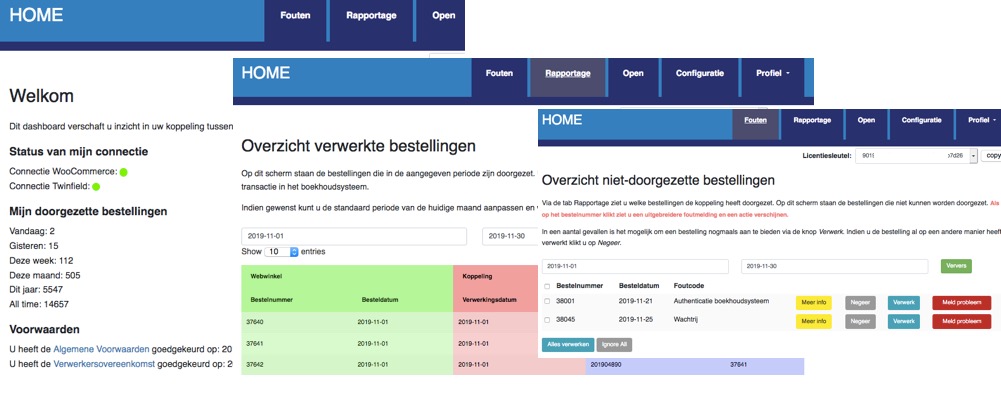
Explanation tabs dashboard
On the Dashboard >> Report you can see which orders or invoices from your Lightspeed eCom webshop, and when, have been transferred to SnelStart.What if orders or invoices are missing in SnelStart
If orders or invoices are missing in SnelStart we recommend following the steps below:- Log in to the dashboard: https://uwkoppeling.webwinkelfacturen.nl. The username and password are included in the registration email.
- Go to the Errors tab and check if order or invoice is there. You may need to adjust the search period if the
order or invoice is from a previous month. If you find order or invoice in this overview:
- Check the error code and verify whether you can resolve it yourself.
- If yes resolve the issue and click the blue Process button to resubmit the order or invoice.
- If not use the red Report problem button to create a ticket with us.
- Note if there are multiple errors, please create only 1 or 2 tickets. We will automatically see the other issues.
- Go to the Report tab and see if order or invoice is listed there. If so, you'll often see an identifier for SnelStart (in the purple section of the overview) that you can use to search for order or invoice.
- Go to the Open tab and check if order or invoice is there.
- If you cannot resolve the issue, you can always create a ticket via the green Ask us button.