1.Introduction
This is the manual for the integration between Lightspeed eCom and WeFact.
- This integration is a financial integration. It is not a logistics integration. It is not suitable for updating customers in WeFact, printing packing slips, or synchronizing products/inventory.
- This integration does not replace the work of an accountant. It saves time because you no longer have to retype documents. The accountant is still needed for advice, expertise, and control.
Tip: Other customers using this integration found the tips in the FAQ for Lightspeed eCom and in the FAQ for WeFact.
You install this integration from the Lightspeed eCom App Store. If you select the Accounting category, our apps will appear automatically. You can recognize us as a supplier by the blue area and the white gear icon at the top right. If you click on the App, you will see a description and the Install button. Upon activation, you will be automatically guided through the configuration screens.
The installation is complete when both connection dots are green, and the settings in the Configuration tab have been entered and saved.
Important: Once the integration is installed, always log in to the dashboard via https://uwkoppeling.webwinkelfacturen.nl, and not from the app store.
The trial period for the integration is 30 days.
If you want to install another integration, you can do so in the same way. Make sure you are logged out of the integration dashboard and preferably start the new installation in an incognito browser.
If you want to terminate the integration, you can simply remove the app from the app store in your backend.
Are you switching to another accounting system and want to create a new integration? You can install the new app from the app store in your backend. Make sure you are logged out of the dashboard of the old integration and preferably start the new installation in an incognito browser.
Are you switching to another webshop system? Via our integrations page you can see whether you install it from the relevant app store, or by means of an installation link.
Has the installation been successful, but do you see in the dashboard of the integration the old license key still present when you click the dropdown arrow next to the key (even though that app/key has been deleted)? If so, please send us an email requesting that the old key be removed.
2.How the integration works
The integration works with webhooks from the Lightspeed eCom webshop. Processing can be done in two ways, namely based on paid orders or invoices. The advantage of the option paid orders is that orders that are not paid do not enter the accounting system. With this option, however, credit notes are not included. With the option invoices all invoices are processed to WeFact, so both debit and credit invoices. You can set the preference for paid orders or invoices via the Configuration tab of the dashboard.
Read more How the integration works .... Read less How the integration works ....
At the start of processing an order, we perform a number of checks on the Lightspeed eCom order or invoice:
- It is checked whether the total of the Lightspeed eCom order / invoice is equal to the sum of the amounts in the order / invoice lines plus the shipping costs amount.
- If the order / invoice is an ICP sale, the VAT number is checked.
- It is checked whether a corresponding VAT code exists in WeFact for the VAT in each line.
- It is checked whether the order or invoice has not already been processed.
Processing orders or invoices
Processing a Lightspeed eCom order or invoice to WeFact takes place in three steps:
- It is checked if the customer already exists in WeFact. If not, the customer is created. Matching is based on the email address.
- If product synchronisation is enabled, missing products will be created in WeFact.
- The WeFact invoice is created and processed.
After the order or invoice has been forwarded and a success message from WeFact has been received, the order or invoice is marked as handled. The Lightspeed eCom order appears at the Reporting tab on the dashboard.
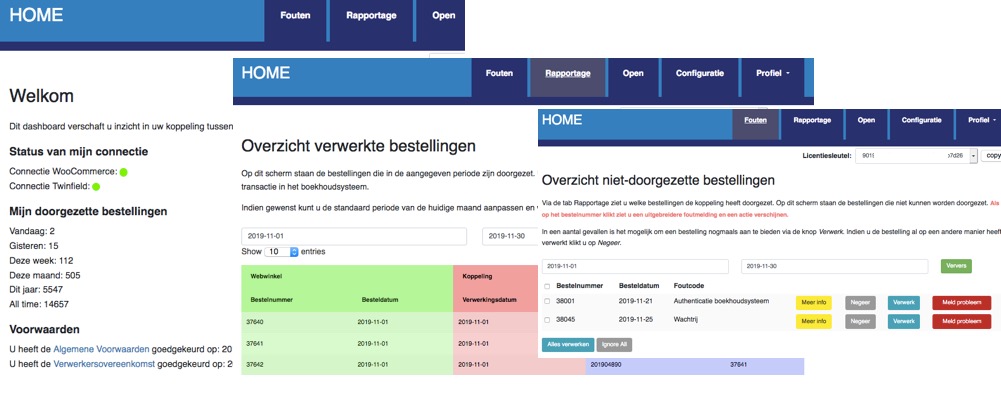
If WeFact returns an error while processing the order or invoice, the order or invoice appears in the Errors tab on the dashboard. Via the yellow button More info more information about the problem can be found. Via the red button Report problem can the order or invoice with all necessary information easily be submitted to us after you have tried to resolve the problem yourself. If the problem is solved, in some cases the orders or invoices can be processed again with the blue Process button.
Data
Information about the data that is processed can be found in the section Day-to-day: To WeFact later in the manual.
3.Required: WeFact API key
- Log in to WeFact
- Go to Settings > API
- Check the box to enable the API
- Add the IP addresses. The IP addresses are 85.10.150.5 and 85.10.143.192. (Note: until recently, these were 188.241.148.36 and 141.138.138.112. The addresses in the image below are therefore not our current IP addresses)
- Copy the generated API key. You will need this key in the next section, Installation.

4.Installation
The integration between Lightspeed eCom and wefact is installed via the Lightspeed App Store. First, the connection with your webshop is established and you authorize the integration to read data from your webshop.
Read more Installation .... Read less Installation ....
Two more steps need to be completed:
1. Establishing the connection with WeFact. This authorizes the integration to write transactions to your WeFact administration and to read information.
2. The configuration itself.
The connection with WeFact is established via an API key that you create within your WeFact account. For the API key, you indicate which IP addresses have access to the API key. This is an extra security measure that, in principle, only needs to be filled in once.
Only if we move servers will the IP addresses need to be updated. Should this become relevant in the future, you will receive information about this in a timely manner.

The integration can provide an invoice layout to the WeFact invoice. You can select the desired invoice layout from the list of available layouts.

When configuring the VAT rates, a link is created between the VAT rates in webshop and the VAT codes and revenue accounts in WeFact. You can always make changes by clicking the blue 'Edit' button and selecting an option from the drop-down menus.
By default, the integration shows a fixed list of VAT rates per EU country. You can configure this fixed list. If you provide OSS, you can easily adjust the list with the correct VAT percentage per country. If you prefer to use the VAT rates from your webshop, you can adjust this in the contract settings. Intra-Community (ICP) and international deliveries
The Intra-Community supplies / ICP option is intended for business-to-business deliveries within the EU. These sales are invoiced with 0% VAT. A VAT number from the customer is required. The International option applies to deliveries outside the EU. For these sales, the integration expects 0% VAT; otherwise, the sales cannot be processed. Separate VAT codes and general ledger accounts can be configured for both ICP and international deliveries.
Once the VAT settings have been configured and saved, you will always see the selected VAT rates. If you want to start over, you can use the grey 'Remove VAT settings' button. Your current settings will then be deleted and you can begin again.

You can create a link here between the payment methods in the webshop and a fixed debtor in your WeFact administration. Orders or invoices with a payment method from the list will then always be posted to this debtor. In that case, no new debtors will be created.
Note: It is not possible to set fixed debtors for ICP orders or invoices. For an ICP order or invoice, a valid VAT number must be transmitted. Therefore, a debtor will always be created in WeFact for an ICP order or invoice.

5.Day-to-day: From Lightspeed
VAT numbers: For business orders within the EU, outside the Netherlands, a VAT number is mandatory. The integration performs a check on the validity of VAT numbers.
Field-level specification orders
| Below is an elaboration at field level when retrieving orders. The general values in the order and the order rules are discussed, the shipping costs and the debtor details. | |
| Name field | Values from Lightspeed eCom order |
| Order-identifier | [id] |
| Order number | [ordernumber_full] |
| Affiliate number | This must be requested separately by the merchant. The field [comment] is used for this. |
| Customer number | [customer][resource][id], this is not used |
| Order and booking date | [createdAt] |
| ICP indication |
An order is an ICP order if:
|
| International indication |
An order is an international order if:
|
| Order status | [status] |
| Payment status | [paymentStatus] |
| Payment method | [paymentTitle] |
| Paymentmethod-id | [paymentId] |
| Total amounts excl VAT | [priceExcl] |
| Total amounts incl VAT | [priceIncl] |
| Total VAT | Total incl - Total excl |
| Total discounts incl or excl VAT | The amounts in the order can be incl. or excl. VAT. This is determined by the field [order_row_taxes_included] |
| Total discounts | 0 |
| Name field | Values from Lightspeed eCom order |
| VAT percentage | [taxRate] * 100 |
| Name product | The name of the product is determined as follows
|
| SKU | [sku] |
| Ean | [ean] |
| Productcode | [articleCode] |
| Amount | [quantityOrdered] |
| Discount excl / incl VAT | [discountExcl] / [discountIncl] |
| Line amounts incl or excl VAT without discount | [basePriceExcl] / [basePriceIncl] * quantity |
| Line amounts incl or excl VAT with discount | [priceExcl] / [priceIncl] |
| Unit amounts incl or excl VAT without discount | [basePriceExcl] / [basePriceIncl] |
| Unit amounts incl or excl VAT with discount | [priceExcl] / [priceIncl] divide by the quantity |
| Accounts and VAT codes from WeFact | These are determined based on the settings in the integration, the delivery country of the order and the VAT percentages. The type for order lines is turnover / revenue. |
| Name field | Values from Lightspeed eCom order |
| Name | Shipping costs [shipmentTitle] |
| VAT percentage | [shopmentTaxRate] * 100 |
| Shipping costs incl or excl VAT without discount | [shipmentBasePriceExcl] / [shipmentBasePriceIncl] |
| Discount Shipping costs incl or excl VAT | [shipmentDiscountExcl] / [shipmentDiscountIncl] |
| Shipping costs incl or excl VAT with discount | [shipmentBasePriceExcl] / [shipmentBasePriceIncl] minus [shipmentDiscountExcl] / [shipmentDiscountIncl] |
| Accounts and VAT codes from WeFact | These are determined based on the settings in the integration, the delivery country of the order and the VAT percentages. The type for shipping costs is shipping / shipping costs. |
| Name field | Values from Lightspeed eCom order |
| Name | Payment costs [paymentTitle] |
| VAT percentage | [paymentTaxRate] |
| Payment costs incl and excl VAT | [paymentBasePriceExcl] / [paymentBasePriceIncl] |
| Accounts and VAT codes from WeFact | These are determined based on the settings in the integration, the delivery country of the order and the VAT percentages. The type for payment costs is payment / payment costs. |
| Name field | Values from Lightspeed eCom order |
| First name | [first_name] |
| Last name | [last_name] |
| Company name | [companyName] |
| Phone number | [phone] |
| Chamber of Commerce number | [companyCoCnumber], a clean-up action takes place here |
| Address line 1 | [addressBillingStreet] [addressBillingNumber] [addressBillingExtension] |
| Address line 2 | [addressBillingStreet2] |
| Zip code | [addressBillingZipcode] |
| City | [addressBillingCity] |
| Country | [addressBillingCountry][code], and the name is determined based on that code |
| Iso country | [addressBillingCountry][code] |
| Shipping address | Same as for the billing address, but now with [addressShipping] instead of [addressBilling] |
| VAT number | [companyVatNumber] - this is checked for correctness |
| Emailaddress | [email] |
Field-level specification invoices
| Below is a specification at field level for retrieving invoices. The debtors from the invoice are read in the same way as for orders. The fields are listed above. | |
| Name field | Values from Lightspeed eCom invoice |
| Invoice-identifier | [id] |
| Invoice number | [number] |
| Order-identifier | [id] of the order associated with the invoice |
| Affiliate number | This must be requested separately by the merchant. The field [comment] is used for this. |
| Invoice date | [createdAt] |
| ICP indication |
An order is an ICP order if:
|
| International indication |
An order is an international order if:
|
| Payment status | [paymentStatus] |
| Payment method | [paymentTitle] |
| Paymentmethod-id | [paymethodId] |
| Total amounts incl or excl VAT | [priceIncl] and [priceExcl] |
| Total VAT | [priceIncl] - [priceExcl] |
| Similar to retrieving customer data from the order, see above. |
| The invoice lines in the Lightspeed invoice have a type. The lines with type equal to product or custom are designated as invoice lines. These invoice lines are processed one by one. | |
| Name field | Values from the Lightspeed eCom invoice line |
| VAT percentage | [taxRate] * 100 |
| Name product | The name of the product is determined as follows
|
| SKU | [sku] |
| Ean | [ean] |
| Productcode | [articleCode] |
| Amount | [quantity] |
| Discount excl / incl VAT | [discountExcl] / [discountIncl] |
| Line amounts incl or excl VAT without discount | [basePiceExcl] / [basePriceIncl] * [quantity] |
| Line amounts incl or excl VAT with discount | [priceExcl] / [priceIncl] |
| Unit amounts incl or excl VAT without discount | [basePriceExcl] / [basePriceIncl] |
| Unit amounts incl or excl VAT with discount | [priceExcl] / [priceIncl] divide by [quantity] |
| Accounts and VAT codes from WeFact | These are determined based on the settings in the integration, the delivery country of the invoice and the VAT percentages. The type for invoice lines is turnover / revenue. |
| The invoice lines in the Lightspeed invoice have a type. The lines with type equal to shipment. The integration expects a maximum of 1 shipping line. | |
| Name field | Values from the Lightspeed eCom shipping line |
| VAT percentage | [taxRate] * 100. If the VAT percentage is 0, it is checked whether the VAT percentage can be determined from [basePriceIncl] and [basePriceExcl] |
| Name | Shipping costs [variant] |
| Amount | 1 |
| Discount excl / incl VAT | [discountExcl] / [discountIncl] |
| Line amounts incl or excl VAT without discount | [basePiceExcl] / [basePriceIncl] |
| Line amounts incl or excl VAT with discount | [priceExcl] / [priceIncl] |
| Unit amounts incl or excl VAT without discount | [basePriceExcl] / [basePriceIncl] |
| Unit amounts incl or excl VAT with discount | [priceExcl] / [priceIncl] |
| Accounts and VAT codes from WeFact | These are determined based on the settings in the integration, the delivery country of the invoice and the VAT percentages. The type for shipping lines is shipment / shipping costs. |
| The invoice lines in the Lightspeed invoice have a type. The lines with type equal to payment. The integration expects a maximum of 1 payment line. | |
| Name field | Values from the Lightspeed eCom payment line |
| VAT percentage | [taxRate] * 100. If the VAT percentage is 0, it is checked whether the VAT percentage can be determined from [basePriceIncl] and [basePriceExcl] |
| Name | Payment costs [variant] |
| Amount | 1 |
| Discount excl / incl VAT | [discountExcl] / [discountIncl] |
| Line amounts incl or excl VAT without discount | [basePiceExcl] / [basePriceIncl] |
| Line amounts incl or excl VAT with discount | [priceExcl] / [priceIncl] |
| Unit amounts incl or excl VAT without discount | [basePriceExcl] / [basePriceIncl] |
| Unit amounts incl or excl VAT with discount | [priceExcl] / [priceIncl] |
| Accounts and VAT codes from WeFact | These are determined based on the settings in the integration, the delivery country of the invoice and the VAT percentages. The type for payment lines is payment / payment costs. |
6.Day-to-day: To WeFact
A order or invoice from the Lightspeed eCom webshop is processed to WeFact as a WeFact invoice. The draft invoice option is default and is used most often; the processed invoice option can be requested from us.
The synchronization of data between Lightspeed eCom and WeFact is as follows:
Even if the WeFact invoice created by the integration has the status sent, that does not mean that WeFact the invoice by email has sent. The status sent can also mean that the invoice was sent manually. If you want the invoice to be sent automatically by email, please contact us via webcare@webwinkelfacturen.nl. We adjust your contract settings so that the integration - after the WeFact invoice has been created - sends an additional command to WeFact to send the invoice to the customer by email.
When processing customer information, it is first checked whether the customer has been processed before. If so, this WeFact debtor is used as the debtor for the WeFact transaction. If the customer is not yet known, they are added to WeFact. Matching is based on email address.
Please note: The integration only creates debtors. The integration does not modify debtors.
We can add products to WeFact. This is disabled by default; please contact us if you would like to enable it. If enabled, the integration first checks whether the products from the order or invoice already exist in WeFact. The integration then adds missing products to the accounting system. If a product already exists in WeFact, it will not be added again. The integration automatically creates the following products in WeFact: Shipping costs, Payment costs, Surcharge, Discount, and Additional costs.
WeFact only accepts SKUs consisting of numbers/letters, without special characters.
When creating invoices, the integration uses the VAT percentage as it is in the of Lightspeed eCom. Even if there is a different VAT percentage in the product of WeFact.
The integration creates the invoice in WeFact, but will not automatically send the invoice to the debtor. It is possible to set an invoice layout. This can be done via the dashboard https://uwkoppeling.webwinkelfacturen.nl, tab Configuration.
Field-level specification WeFact

| Name | Example | Note |
| xml | ||
| VatCalcMethod | incl | This means that the invoice in WeFact will display amounts including VAT. This cannot be changed. WeFact has indicated that invoices are correctly submitted in this way. |
| Debtor | 906 | WeFact debtorID |
| Date | 2023-03-01 21:25:08 | order date |
| InvoiceCode | Empty, upon request order number (default) or invoice number | |
| Description | 000000906/000000345 | order number (default) or invoice number |
| Term | 14 | Not editable |
| Status | 0 | Selecting status 4 - Processed is possible. |
| Invoice profile | As set on the dashboard. | |
| InvoiceLines | ||
| Number | 1 | Amount |
| Description | 3-in-1 Magazine Bundle | Description |
| PriceExcl | 20.65 | Unit price excl VAT. |
| TaxCode | V21 | VAT code |
| ReferenceNumber | 000000906 | order number |
| Cost center | It is possible to have the revenue posted to a default cost center. | |
| Shipping address - via CustomFields. The name fields - such as [verzend_bedrijf] - cannot be adjusted. | ||
| [shipping_company] | BV Sponiza IT | Company name |
| [shipping_firstname] | Soumaya | First name |
| [shipping_lastname] | van Spanje | Last name |
| [shipping_address] | Stationstraat 12 | Shipping address |
| [shipping_zipcode] | 1000 AA | Zipcode shipping address |
| [shipping_city] | Amsterdam | City shipping address |
| [shipping_country] | The Netherlands | Country shipping address |
| Name | Example | Note |
| CompanyName | [company] | Company name |
| Initials | [firstname] | first name |
| Surname | [lastname] | If [lastname] is not provided, we will fill in NN. |
| Taxnumber | [VATnr] | VATnumber |
| Address | [address] | If a house number is provided then: [adres][housenr] |
| Zipcode | [zipcode] | Zip code |
| City | [city] | City |
| Country | [isocountry] | Country |
| emailaddress | [email] | |
| Phonenumber | [telnr] |
| Name | Example | Note |
| productcode | [articlekey] | |
| productname | [name] | |
| productkeyphrase | [description] | |
| price excl | [unitpriceexcl] | Unit price excl VAT. |
| taxcode | VAT code | As set on the dashboard. |
| CostCentre | [defaultcostcenter] | If this is present, we will display it. |
7.Support
Read more Support .... Read less Support ....
Explanation tabs dashboard
On the Dashboard >> Report you can see which orders or invoices from your Lightspeed eCom webshop, and when, have been transferred to WeFact.What if orders or invoices are missing in WeFact
If orders or invoices are missing in WeFact we recommend following the steps below:- Log in to the dashboard: https://uwkoppeling.webwinkelfacturen.nl. The username and password are included in the registration email.
- Go to the Errors tab and check if order or invoice is there. You may need to adjust the search period if the
order or invoice is from a previous month. If you find order or invoice in this overview:
- Check the error code and verify whether you can resolve it yourself.
- If yes resolve the issue and click the blue Process button to resubmit the order or invoice.
- If not use the red Report problem button to create a ticket with us.
- Note if there are multiple errors, please create only 1 or 2 tickets. We will automatically see the other issues.
- Go to the Report tab and see if order or invoice is listed there. If so, you'll often see an identifier for WeFact (in the purple section of the overview) that you can use to search for order or invoice.
- Go to the Open tab and check if order or invoice is there.
- If you cannot resolve the issue, you can always create a ticket via the green Ask us button.